
The RV trip planner that keeps every stop organized

Build your itinerary, track every reservation, and know each stop is ready before travel day. On iPhone, iPad and the web.
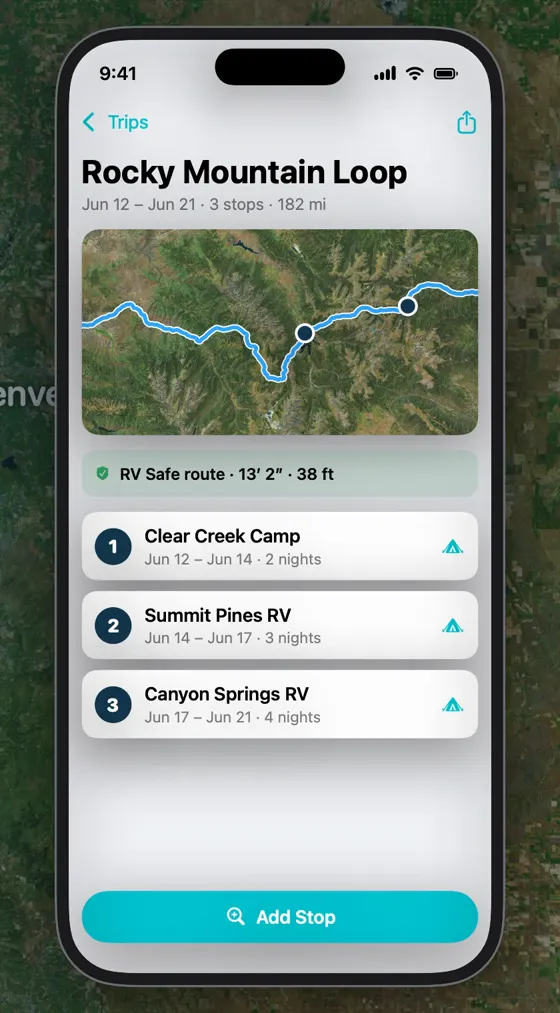
Trip screen showing Rocky Mountain Loop, June 12 to 21, three stops and 182 miles, with an RV Safe route and three campgrounds

Your whole trip on one screen

  • Itinerary timeline: numbered stops with dates and nights, plus the drive time and distance to the next stop.
  • Booking details: site number, reservation number, cost and notes for every campground.
  • Scheduling checks: warnings when dates overlap or when there's a gap between stops.
  • Upcoming or all: hide stops you've finished, or see the whole trip.
  • Unscheduled stops: park ideas without dates and schedule them later.

Plan smarter, travel calmer

Trip Readiness

Each stop is rated Ready, Review or High Risk, checking dates, reservation, site number, contact details, location and weather alerts.

AI trip search (Beta)

Describe your trip, like "two weeks from Denver to Yellowstone, 4 hours a day," and get suggested stops to review.

Weather & route alerts

RV Itinerary checks your stops for the next 7 days and notifies you about new severe-weather or route alerts, so you can adjust before you leave.

Bucket list near your route

See the saved places within 25 miles of each drive and add them as stops.

Ratings & reviews

Read what fellow RVers say, and rate your own stays from 1 to 10 with photos.

Spot 2 Night

Plans changed? Find RV sites available tonight near you, sized to your rig.

Calendar, PDF & web

Sync to Apple Calendar, share a printable PDF, or plan on a computer with Premium.

Questions

Can I plan trips on my computer?
Yes. Premium subscribers can log in to the RV Itinerary web app at rvitinerary.com to plan trips on a bigger screen. Trips, bucket list items and RV details sync between the web app and the iPhone app.
How do I find an RV site for tonight?
Tap Spot 2 Night on the app's Today screen. It searches for RV sites available tonight near you, sized to your RV's length.
How do I know a stop is ready before I go?
Each stop gets a Trip Readiness rating: Ready, Review or High Risk. It checks your travel dates, reservation, site number, campground contact details, location and active weather alerts, so you can fix gaps before travel day.
Does RV Itinerary warn me about bad weather on my trip?
Yes. RV Itinerary checks the stops in the next 7 days of your trip for active severe-weather alerts, and checks the drive to each stop for route alerts. When something new comes up, it sends a notification so you have time to change your route, dates or campground. The same alerts feed each stop's Trip Readiness rating.
Can I share my itinerary or add it to my calendar?
Yes. You can sync trips to Apple Calendar, share a printable PDF of your trip, and Premium subscribers can subscribe to a calendar feed that updates as the trip changes.

Your next trip starts with a safer route

Download RV Itinerary free on iPhone. Enter your rig's height once, and every route checks for low clearances.