 RV Itinerary
RV-safe navigation on Apple CarPlay
Your route, next turn and arrival time on the dashboard, planned for your RV's height so you're never surprised by a low bridge.
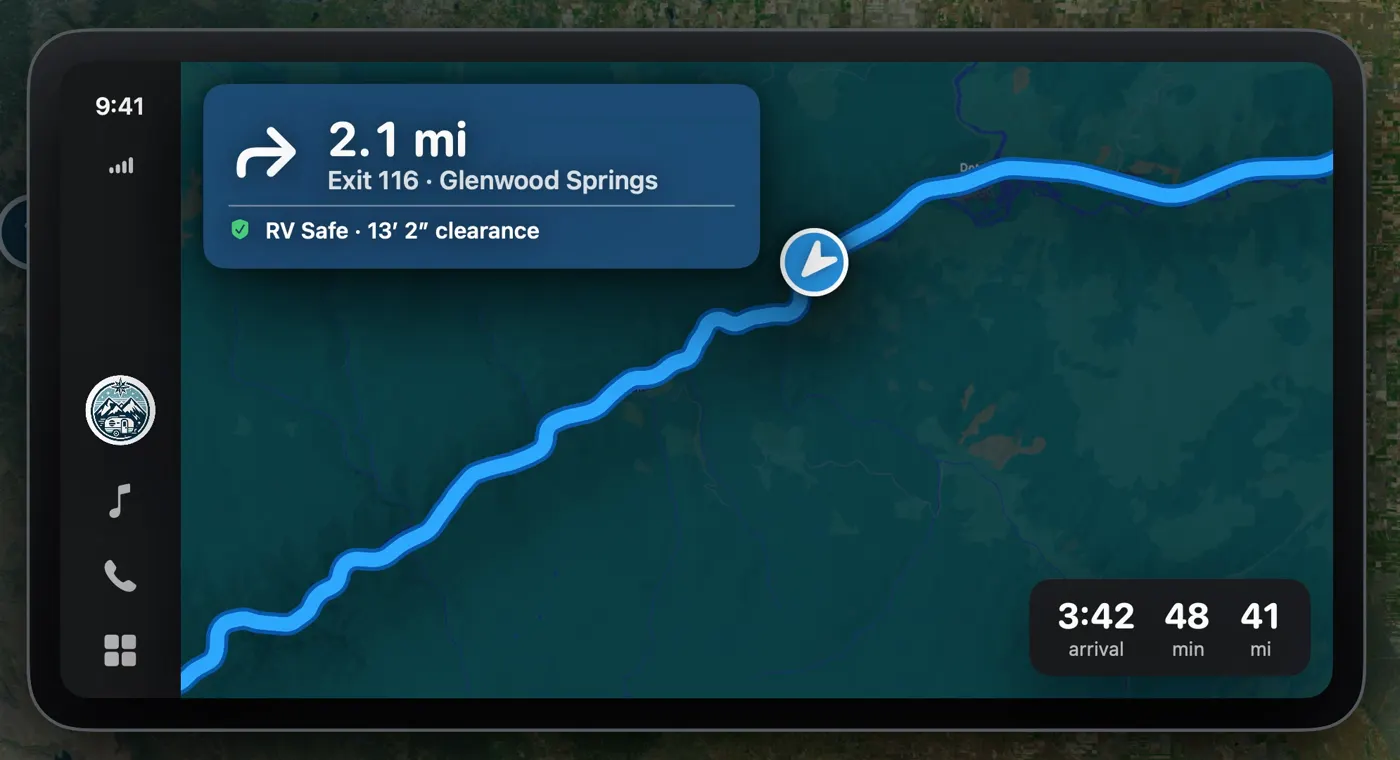
Made for the driver's seat
- RV-safe turn-by-turn: the same low-clearance-checked route you planned on your iPhone.
- Clearance at a glance: each instruction shows that the road is RV safe for your height.
- Emergency services: hospitals, vets, RV repair and towing near you.
- Bucket list alerts: a heads-up when a saved place is nearby.
- Hands-free with Siri: say "Navigate to my next campground in RV Itinerary."
Questions
Does RV Itinerary avoid low bridges and tunnels?
Yes. Every route is checked against a low-clearance database using the height you enter for your RV. A route that passes under a bridge or tunnel too low for your rig isn't used; the app looks for a detour around it and tells you if no RV-safe route can be found. Clearances near your route are shown on the map. Clearance data can be incomplete, so always obey posted signs.
Does RV Itinerary work with Apple CarPlay?
Yes. RV Itinerary shows RV-safe, turn-by-turn navigation on your CarPlay screen, along with nearby emergency services and alerts when you're close to places on your bucket list.
Is RV Itinerary available on Android?
No. RV Itinerary is built for Apple devices: iPhone, iPad and Apple CarPlay, plus a web app for Premium subscribers that works in any modern browser. It requires iOS 18 or later.
Your next trip starts with a safer route
Download RV Itinerary free on iPhone. Enter your rig's height once, and every route checks for low clearances.